Main Navigation

Centro de Ayuda Oficial de Betcris
  • Back to Betcris
  • Log In
  • Sign Up
  • English
    • Español
    • Português
    • 简体中文
  • SIGN UP
  • LOG IN
  • Recover Password

Search

When autocomplete results are available use up and down arrows to review and enter to go to the desired page. Touch device users, explore by touch or with swipe gestures.
Home > User Guide > Help Center > About Your Account > Security PIN

Articles in this section

  • How to Update Our Android Application Correctly
  • Site Improvements
  • How to Bet Using a Free Play
  • How do I log into my Betcris account using my fingerprint with my phone?
  • How do I create a Betcris account?
  • Use of VPN & Proxy
  • Your Betcris Betslip
  • Login Issues – I don’t remember my account ID
  • Open Bets History
  • Your Betcris Account Cashier
  • Welcome to Betcris!
  • Contact our Live Chat
  • Deposits, withdrawal and betting history
  • Find Your Real Money Balance and/or Free Plays
  • Security PIN
  • Login Issues – I don’t remember my password
  • Login Issues – General Instructions

Security PIN

If you want to review or modify your PIN number, follow these steps:

Mobile users:

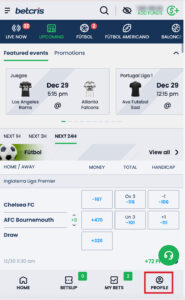
1. Choose the ‘Profile’ icon at the bottom of the page.
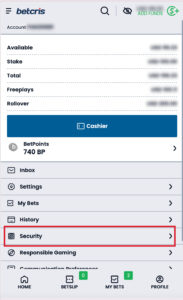
2. Select ‘Security’ from the menu.
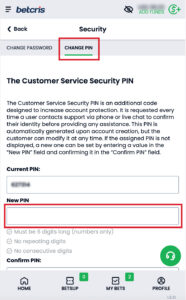
3. Then choose ‘Change PIN’. If you already have a PIN set, you will be able to see your current PIN. If you want to change it, enter the new number in New PIN (follow the required format instructions), re-enter it in ‘Confirm PIN’ and choose ‘Save’.
Desktop users:

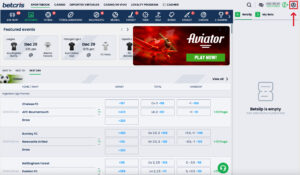
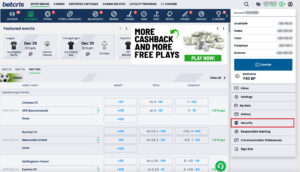
1. To view or reset your PIN, please select the ‘Profile’ icon in the top-right corner of your screen.
2. Select ‘Security’ from the menu.
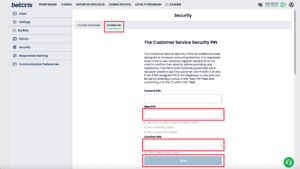
3. Click ‘Change PIN’. If you already have a PIN set, you will be able to see your current PIN. If you want to change it, enter the new number in ‘New PIN’ (follow the required PIN format instructions), then re-enter it in ‘Confirm PIN’ and select ‘Save’.
Important:

If you are still unable to review or change your PIN, or if you have questions about this process, simply contact our Customer Care team via Live Chat, or send us an email at help@betcris.com with your questions.

Regresar arriba

Related Articles

  • How to Update Our Android Application Correctly
  • Site Improvements
  • How to Bet Using a Free Play
  • How do I log into my Betcris account using my fingerprint with my phone?
All Rights Reserved © Betcris Sportsbook™